
Eraser
Use the tool to erase lines or fills.
Eraser
Use the tool to erase lines or fills.
When you click the eraser-tool the following options appears:
 |
 |
 |
|
Click an option to get an explanation.
Eraser mode
Eraser mode is used to control how the eraser-tool should work:
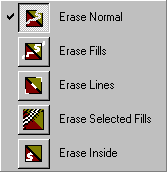
Erases Normal...erases both lines and fills.
Erase Fills...only erases fills - not lines..
Erase Lines...only erses lines - not fills..
Erase Selected Fills...only erases the current selected fill.
Erase Inside...only erases fills in the color and the area where you start the erasing..
Faucet
The faucet erases entire lines or areas with fill.
If you use the faucet on selected lines and/or fills the entire selection will be deleted.
Eraser shape
Use this option to change the shape of the eraser-tool.